![lumina learning logo rev white.png]](https://support.luminalearning.com/hs-fs/hubfs/lumina%20learning%20logo%20rev%20white.png?height=39&name=lumina%20learning%20logo%20rev%20white.png)
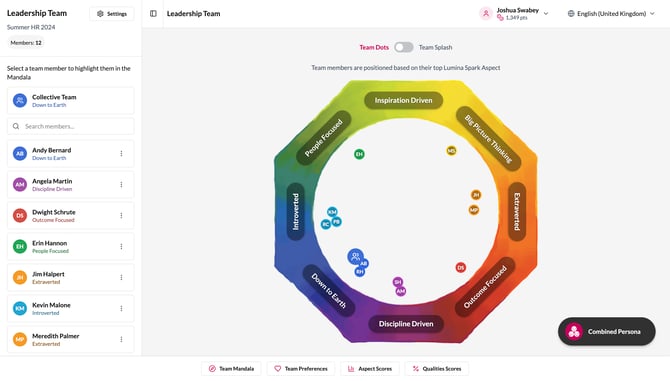
The Lumina Team Viewer you already know and love is evolving into the new Lumina Team at the end of November.
Built on the practitioner community’s feedback, Lumina Team is moving beyond a snapshot of the collective behavioural styles in a team into a richer exploration of the dynamics and patterns influencing the way a team performs together.
Here's what you need to know ahead of the launch:
What is changing in the new Lumina Team?
Lumina Team: old and new at a glance
What do I need to do to get access to the new Lumina Team experience?
Can I still use the current Team Viewer after the launch?
What will happen to my existing Team Viewer data?
I'm currently using Team Viewer with clients. Will this affect my upcoming sessions?
Is there a limit to the number of people I can add to a Team?
What languages will the Lumina Team be available in?
What is changing in the new Lumina Team?
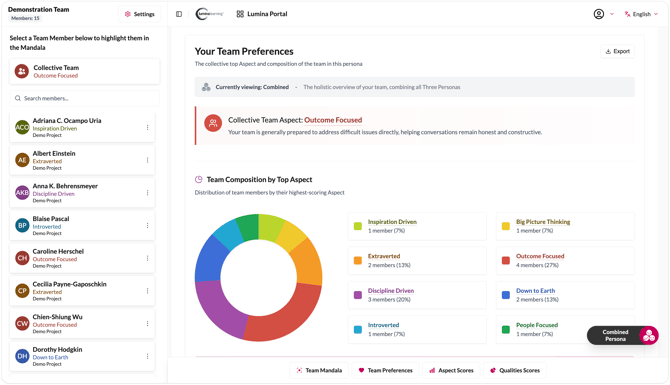
Bringing in the data depth of individual Portraits, the new experience will provide a clearer view of the team with more features to explore a team’s strengths, development areas, overextensions and quality patterns.
You’ll also have more flexibility in how you see team data in your sessions, with some exciting new ways to share insights with teams after.
We will be sharing more of what's coming with you soon. In the meantime, sign up to your Global Practitioner Academy call on 23 November to meet the features in Lumina Team and all the new resources available to support your team sessions.
Sign up here: luminalearning.com/meet-the-new-lumina-team
Lumina Team: old and new at a glance
The table below shows what you can now expect in the upgraded Team experience.
|
Feature |
Current / Legacy Team |
New Lumina Team |
|
Team Dots |
✓ |
✓ Same |
|
Persona Switcher |
✓ |
✓ Same |
|
Customisable Team Report (PDF) |
✓ |
✓ Enhanced |
|
Anonymity |
✓ |
✓ Same / Enhanced |
|
Team Splash |
— |
✓ New |
|
Team Summary |
— |
✓ New |
|
Team 8 Aspects |
— |
✓ New |
|
Team 24 Qualities |
— |
✓ New |
|
Explore individual team members |
— |
✓ New |
|
Compare team members |
— |
✓ New |
|
Highlight team Leader |
— |
✓ New |
|
Team member Splash/QR Code Gallery |
— |
✓ New |
|
Team member access via participant account |
— |
✓ New |
|
Sharing access via link |
— |
✓ New |
|
Exportable images |
— |
✓ New |
|
Accessibility |
— |
✓ Improved |
What do I need to do to get access to the new Lumina Team experience?
No action is needed from you. Your existing Teams will automatically be upgraded to the new experience at no additional cost.
Can I still use the current Team Viewer after the launch?
Yes, temporarily. You'll have access to the current Team Viewer for a limited time while you familiarise yourself with the new experience.
However, the legacy version will become read-only. This means you'll still be able to view your existing projects in the Team Viewer, but any edits or updates will need to be made in the new Lumina Team.
What will happen to my existing Team Viewer data?
All your existing Teams and their data will automatically move into the new experience. You won't need to recreate your Teams or start again. You'll be able to continue working with your existing Teams in the upgraded experience.
I'm currently using Team Viewer with clients. Will this affect my upcoming sessions?
You can continue using Team Viewer as normal until the new experience launches.
After the launch, your existing Teams and their data will be available in the new experience, so you won't need to recreate anything.
You'll also have temporary read-only access to the legacy Team Viewer if you need to refer to your existing Teams in their previous format.
Is the pricing changing?
Yes. The new Lumina Team will be priced at a flat 100 points for up to 15 team members. Additional team members can be added for 10 points per person.
All your existing Teams will be upgraded at no additional cost.
Is there a limit to the number of people I can add to a Team?
Yes. The new Lumina Team will support up to 150 team members per Team.
What languages will the Lumina Team be available in?
The upgraded Team experience will support the following languages:
- Czech
- Danish
- German
- English (GB)
- English (United States)
- Spanish (Spain)
- French (France)
- Italian
- Japanese
- Dutch (Netherlands)
- Polish
- Portuguese (Portugal)
- Slovak
- Chinese (Simplified)
- Chinese (Traditional)
What stays the same?
While Lumina Team will offer more ways to explore and discuss the behavioural dynamics influencing a team’s performance, the core Team Viewer functionality you already know remains the same:
- Your existing Teams and their data will be brought into the new experience so you don't need to recreate them.
- The core Lumina Team model and insights remain the same.
- Features you already use, such as the Team Dots, the Persona Switcher, Team Report export and anonymity settings, remain available.
- Lumina Team continues to help teams understand how they show up together and use those insights to improve how they work together.
The new experience will give you more data, insights and narrative, while making the experience more intuitive, engaging and accessible.
Please reach out to your account manager or support@luminalearning.com if you have any other questions.
Join us to meet Lumina Team and see all the new features in action at your Global Practitioner Academy call on 23 November. Sign up here: luminalearning.com/meet-the-new-lumina-team